👉 Join the conversation on Discord
Each lesson on this learning site has its own post in the foundations-course channel of the CAI Discord server. If you have any question about this video, feel free to post and we'll try to help out!
Configuring C2PA Tool Settings
In the previous lesson we looked at how to install the c2patool and signed our first asset and now we’re going to configure it to handle a series of use cases that we’re going to look at in the upcoming lessons.
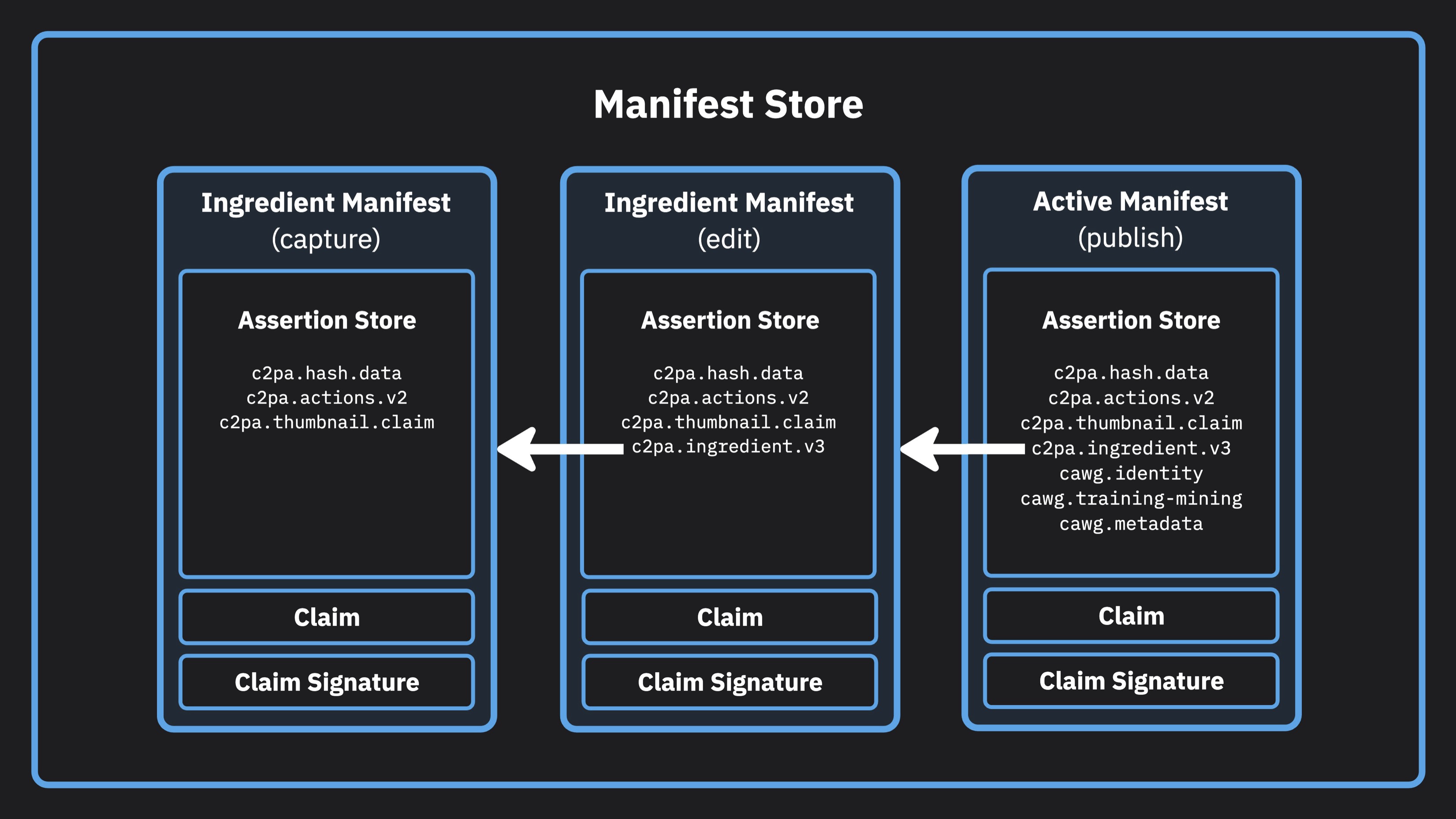
To add some context to the things that we’re going to configure, what I want to do is walk through a C2PA manifest store and talk about some of the components at a really high level. We’ll use this exploration to reveal the things we need to configure for our manifest builder and signer.
Example manifest store
Code from the lesson
// manifest.json

{
  "claim_generator_info":[{
    "name": "Demo Camera App",
    "version": "1.0.0"
  }]
}
# settings.toml

[builder]

created_assertion_labels = [
  "c2pa.actions",
  "c2pa.thumbnail.claim",
  "c2pa.thumbnail.ingredient",
  "c2pa.ingredient"
]

[builder.actions.auto_created_action]
enabled = false

[builder.actions.auto_opened_action]
enabled = true


[signer]

[signer.local]

alg = "es256"

sign_cert = """-----BEGIN CERTIFICATE-----
MIIChzCCAi6gAwIBAgIUcCTmJHYF8dZfG0d1UdT6/LXtkeYwCgYIKoZIzj0EAwIw
gYwxCzAJBgNVBAYTAlVTMQswCQYDVQQIDAJDQTESMBAGA1UEBwwJU29tZXdoZXJl
MScwJQYDVQQKDB5DMlBBIFRlc3QgSW50ZXJtZWRpYXRlIFJvb3QgQ0ExGTAXBgNV
BAsMEEZPUiBURVNUSU5HX09OTFkxGDAWBgNVBAMMD0ludGVybWVkaWF0ZSBDQTAe
Fw0yMjA2MTAxODQ2NDBaFw0zMDA4MjYxODQ2NDBaMIGAMQswCQYDVQQGEwJVUzEL
MAkGA1UECAwCQ0ExEjAQBgNVBAcMCVNvbWV3aGVyZTEfMB0GA1UECgwWQzJQQSBU
ZXN0IFNpZ25pbmcgQ2VydDEZMBcGA1UECwwQRk9SIFRFU1RJTkdfT05MWTEUMBIG
A1UEAwwLQzJQQSBTaWduZXIwWTATBgcqhkjOPQIBBggqhkjOPQMBBwNCAAQPaL6R
kAkYkKU4+IryBSYxJM3h77sFiMrbvbI8fG7w2Bbl9otNG/cch3DAw5rGAPV7NWky
l3QGuV/wt0MrAPDoo3gwdjAMBgNVHRMBAf8EAjAAMBYGA1UdJQEB/wQMMAoGCCsG
AQUFBwMEMA4GA1UdDwEB/wQEAwIGwDAdBgNVHQ4EFgQUFznP0y83joiNOCedQkxT
tAMyNcowHwYDVR0jBBgwFoAUDnyNcma/osnlAJTvtW6A4rYOL2swCgYIKoZIzj0E
AwIDRwAwRAIgOY/2szXjslg/MyJFZ2y7OH8giPYTsvS7UPRP9GI9NgICIDQPMKrE
LQUJEtipZ0TqvI/4mieoyRCeIiQtyuS0LACz
-----END CERTIFICATE-----
-----BEGIN CERTIFICATE-----
MIICajCCAg+gAwIBAgIUfXDXHH+6GtA2QEBX2IvJ2YnGMnUwCgYIKoZIzj0EAwIw
dzELMAkGA1UEBhMCVVMxCzAJBgNVBAgMAkNBMRIwEAYDVQQHDAlTb21ld2hlcmUx
GjAYBgNVBAoMEUMyUEEgVGVzdCBSb290IENBMRkwFwYDVQQLDBBGT1IgVEVTVElO
R19PTkxZMRAwDgYDVQQDDAdSb290IENBMB4XDTIyMDYxMDE4NDY0MFoXDTMwMDgy
NzE4NDY0MFowgYwxCzAJBgNVBAYTAlVTMQswCQYDVQQIDAJDQTESMBAGA1UEBwwJ
U29tZXdoZXJlMScwJQYDVQQKDB5DMlBBIFRlc3QgSW50ZXJtZWRpYXRlIFJvb3Qg
Q0ExGTAXBgNVBAsMEEZPUiBURVNUSU5HX09OTFkxGDAWBgNVBAMMD0ludGVybWVk
aWF0ZSBDQTBZMBMGByqGSM49AgEGCCqGSM49AwEHA0IABHllI4O7a0EkpTYAWfPM
D6Rnfk9iqhEmCQKMOR6J47Rvh2GGjUw4CS+aLT89ySukPTnzGsMQ4jK9d3V4Aq4Q
LsOjYzBhMA8GA1UdEwEB/wQFMAMBAf8wDgYDVR0PAQH/BAQDAgGGMB0GA1UdDgQW
BBQOfI1yZr+iyeUAlO+1boDitg4vazAfBgNVHSMEGDAWgBRembiG4Xgb2VcVWnUA
UrYpDsuojDAKBggqhkjOPQQDAgNJADBGAiEAtdZ3+05CzFo90fWeZ4woeJcNQC4B
84Ill3YeZVvR8ZECIQDVRdha1xEDKuNTAManY0zthSosfXcvLnZui1A/y/DYeg==
-----END CERTIFICATE-----
"""

# Private key
private_key = """-----BEGIN PRIVATE KEY-----
MIGHAgEAMBMGByqGSM49AgEGCCqGSM49AwEHBG0wawIBAQQgfNJBsaRLSeHizv0m
GL+gcn78QmtfLSm+n+qG9veC2W2hRANCAAQPaL6RkAkYkKU4+IryBSYxJM3h77sF
iMrbvbI8fG7w2Bbl9otNG/cch3DAw5rGAPV7NWkyl3QGuV/wt0MrAPDo
-----END PRIVATE KEY-----
"""

tsa_url = "http://timestamp.digicert.com"
Getting more help
You can access the CAI Docs to learn more about implementing Content Credentials. If you have questions about this video, there is a forum set up on the CAI Discord for each video. You can access discussion for this video here. We would love to see your questions there!